For most UK sole traders deciding between Cuppa vs QuickBooks, the core trade-off is:
- Cuppa for lower complexity and faster weekly bookkeeping
- QuickBooks for broader accounting depth and reporting power
If your business is simple, reducing admin friction is usually the better long-term move.
Key Takeaways
- Cuppa is typically better for straightforward sole-trader workflows.
- QuickBooks is typically better when you need a wider accounting toolkit.
- The highest-value tool is the one you use consistently, not the one with the most features.
Cuppa vs QuickBooks at a Glance
| Criteria | Cuppa | QuickBooks |
|---|---|---|
| Core approach | Sole-trader-first | Full accounting platform |
| Setup complexity | Low | Medium to high |
| Day-to-day admin | Lower for simple setups | Higher for simple setups |
| Best for | Simplicity and compliance routines | Expanded accounting control |
| Learning curve | Low | Medium to high |
Pricing and Total Cost of Ownership
Advertised UK pricing (last checked: 27 February 2026):
| Plan | Cuppa | QuickBooks |
|---|---|---|
| Entry plan | Free plan, or Pro at £6/month (£59/year) | Sole Trader: £8 + VAT/month (first 6 months) |
| Standard paid plan | £6/month (Pro, for HMRC filing) | Sole Trader: £16 + VAT/month (after intro period) |
| Annual option | £59/year (Pro) | Usually monthly pricing |
| Intro offers | No free trial (Free plan available forever) | 6-month promotional pricing |
Notes:
- Prices above are publicly advertised list prices and may change.
- QuickBooks often runs introductory discounts, so effective price changes over time.
- Always verify before purchasing: Cuppa pricing and QuickBooks pricing.
Then include your time cost. For solo businesses, weekly admin effort can outweigh minor subscription differences.
MTD ITSA Workflow Considerations
MTD compliance is mostly a process problem: accurate records, maintained regularly, and submitted on time.
Reference: HMRC guidance for MTD Income Tax.
A lighter workflow can reduce missed admin and end-of-quarter catch-up.
Migration from Spreadsheets or Legacy Setup
Cuppa is often easier when:
- your records are simple
- you want clean setup with fewer decisions
- you mainly need income/expense tracking and clarity
QuickBooks is often better when:
- you need advanced accounting workflows
- your reporting needs are broad
- you are comfortable with deeper platform configuration
Pros and Cons Summary
Cuppa
Pros
- easy to adopt for sole traders
- focused workflow
- lower operational overhead
Cons
- less broad than enterprise-style accounting products
QuickBooks
Pros
- feature-rich accounting environment
- deeper reporting and controls
Cons
- can be heavier than needed for simple sole-trader operations
See the Difference
Screenshots tell the story better than any feature table.
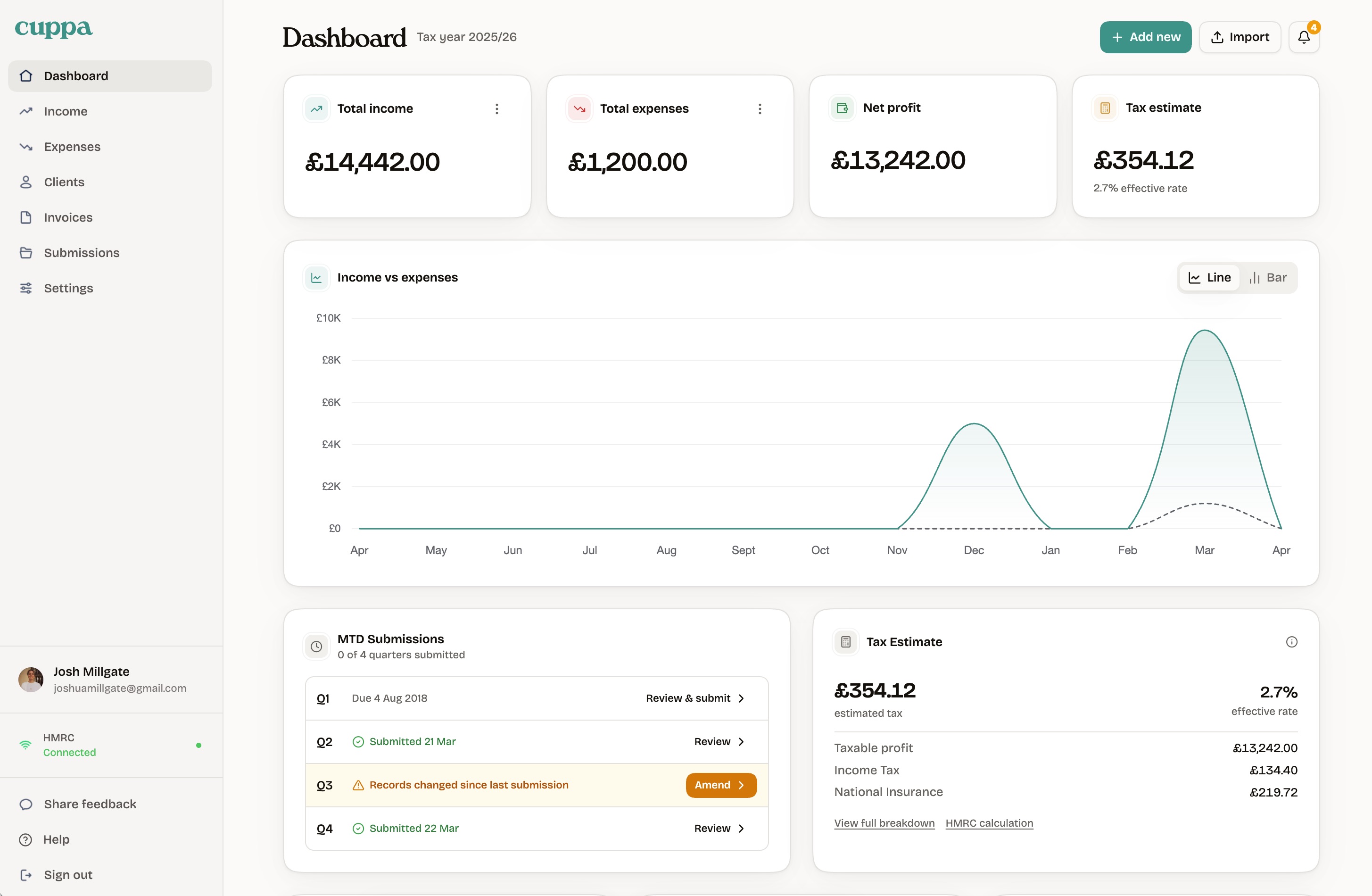
Cuppa's dashboard:
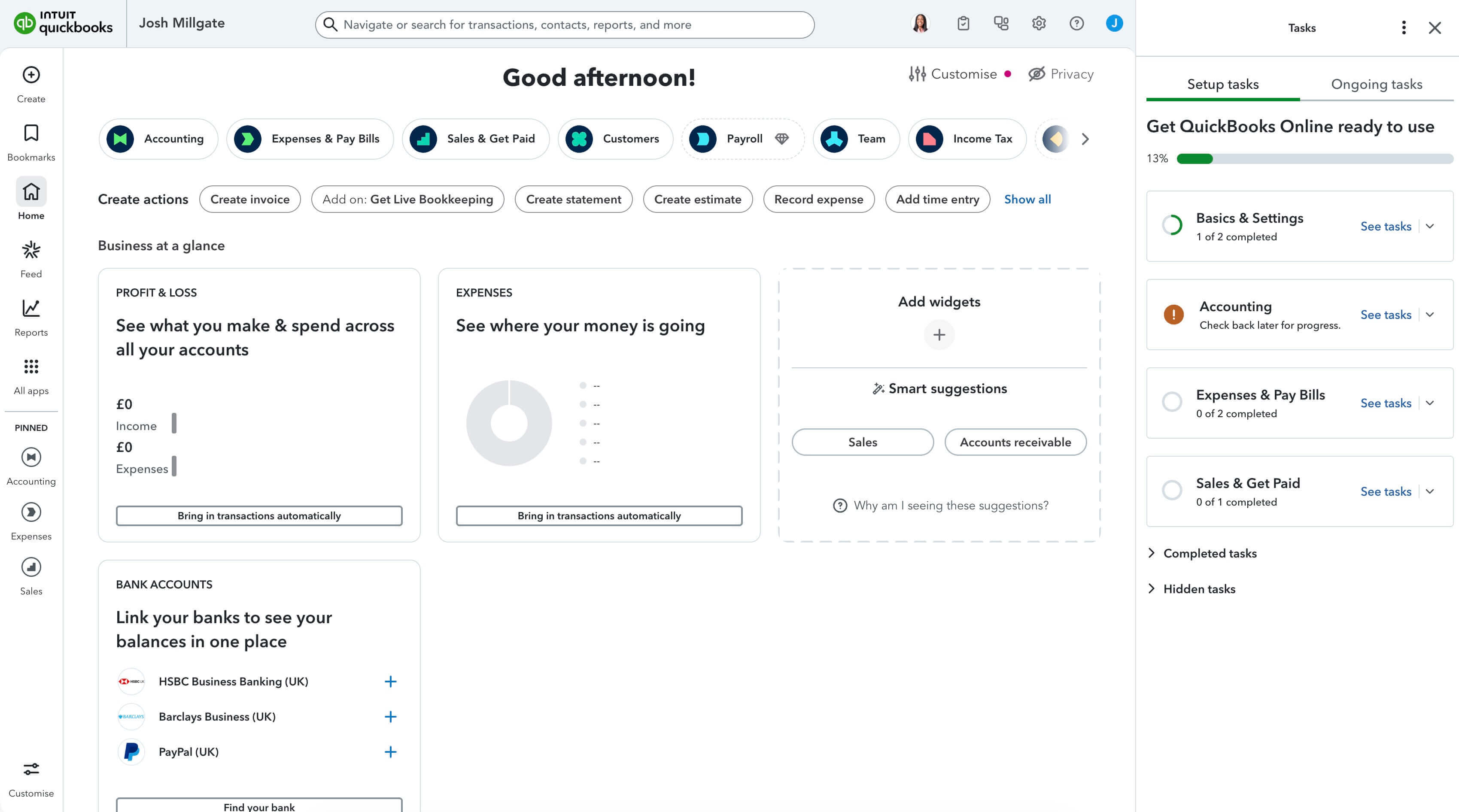
QuickBooks' dashboard:
Cuppa gives you four numbers that matter: total income, total expenses, net profit, and your tax estimate. Below that, a clear income vs expenses chart and your recent transactions. That is the entire dashboard.
QuickBooks greets you with a setup checklist, widget suggestions, "smart suggestions", bank connection prompts, and a sidebar full of icons. Before you can record a single expense, you are making decisions about customisation and configuration.
For sole traders who want bookkeeping to be simple, accessible, and headache-free, the difference is obvious. Cuppa is designed so you spend less time in the app and more time on your business. No setup wizard. No onboarding tasks. No visual noise. Just a clean, beautiful interface that works from day one.
Verdict: Which Should You Choose?
Choose Cuppa if your goal is low-friction compliance and consistent weekly bookkeeping.
Choose QuickBooks if you need deeper accounting workflows and can justify additional setup and complexity.
Related reading: